
Recognising Accessibility Issues

Apps, websites and other softwares should be available to everyone regardless of their abilities; a system should work equally well for a sighted person using a standard mouse and screen, as it should for a blind person using a Braille output or screen reader. There are other issues too; audio cues won’t work for deaf people, features that …
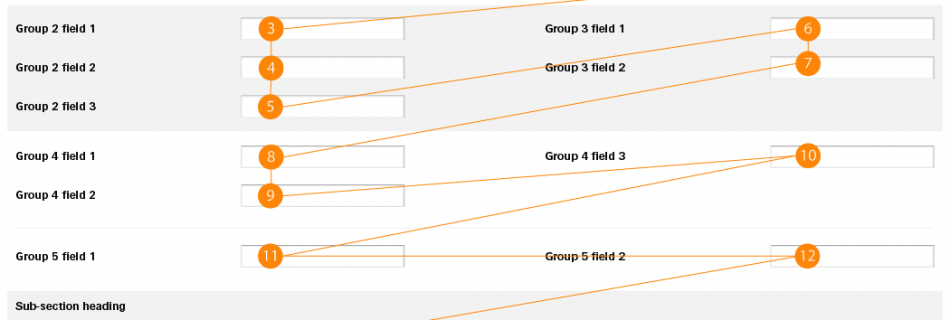
A form sequencing diagram showing the order of progress through a complex, multi-sectional form.

Form Sequencing

Whenever the subject of information flow in forms was raised I discovered conflicting evidence for vertical or horizontal flows, ordering and grouping. In trying to establish the definitive answer I carried out three different user tests: a sort test where users were asked to arrange data into a two-column structure, a flow direction test where users were asked to …

Cognitive Overload

Back in the 1970’s, 3 friends clubbed together to buy themselves a TV for the house they shared. Each of them managed to save £10 for the TV so out they went. Eventually they came across a shop that had, in the window, an excellent model with 3 preset channel buttons plus 1 spare. It …

Accessibility Testing: Visual Impairment

I’ve been doing some accessibility testing recently and came across WebbIE 3 If you’re testing against visual impairments then it’s worth checking WebbIE 3 out. In their own words: “WebbIE re-presents the information from a web page in an accessible format suitable for a screen reader.” Basically, this browser will strip pages down to just the content …

Basic UX Principles: Interference Effects

Mental processing in your user is similar to processing in a computer – the more processor you devote to different processes, the slower and less responsive it will become. Try not to distract your user too much with flashing images and animations unless that’s exactly what they’ve come to see.

Basic UX Principles: Hick’s Law

Hick’s Law states that the time is take to make a decision increases as the number of choices increases. If you give your user too many options then you site or application may become too time-consuming to be of use.

Basic UX Principles: Consistency

A very important aspect of user experience design is simply making things work in the same way throughout your site – If you start by putting ‘submit’ buttons in the bottom right-hand corner of your forms, then you need to make sure that’s where they always are.

Basic UX Principles: Accessibility

Accessibility shouldn’t be a concession. As you design your next site you should be trying to make sure that all content is available to all ranges of abilities without resorting to secondary content streams – you shouldn’t need alternate content for people with different abilities; the original content should be able to support all abilities